Binary Numbers Lab: Decimal to Binary
16 + 8 + 1 = 25
How do you convert decimal to binary?
To convert decimal to binary, find the biggest power of 2 that fits, write 1 for it, subtract it, and repeat down to 1, writing 0 for every place you skip. You can also keep dividing by 2 and read the remainders from the bottom up. Example: 25 = 16 + 8 + 1, so 25 in binary is 11001.
In this lab you can
- Type a number in decimal, binary, hex or octal and see the other three at once, with 8 bulbs that show every bit.
- Tap the bulbs to build a number and watch the sum of place values (like 16 + 8 + 1 = 25) change.
- Step through decimal to binary two ways: take away powers of 2, or divide by 2 and read the remainders.
- Count in binary and watch the carry roll left, mix hex colours, and write your name in binary (ASCII).
- Turn on Guess first to try each answer yourself, and print binary cards and worksheets for class.
Stations in this lab: Count in binary · Decimal to binary · Binary to decimal · Hex and octal · Your name in binary
What are binary numbers?
Binary numbers are numbers written in base 2, with only two digits: 0 and 1. In our everyday decimal system each place is worth 10 times the place to its right (ones, tens, hundreds, as in the place value game). In binary each place is worth 2 times the place to its right: 1, 2, 4, 8, 16, 32, 64, 128.
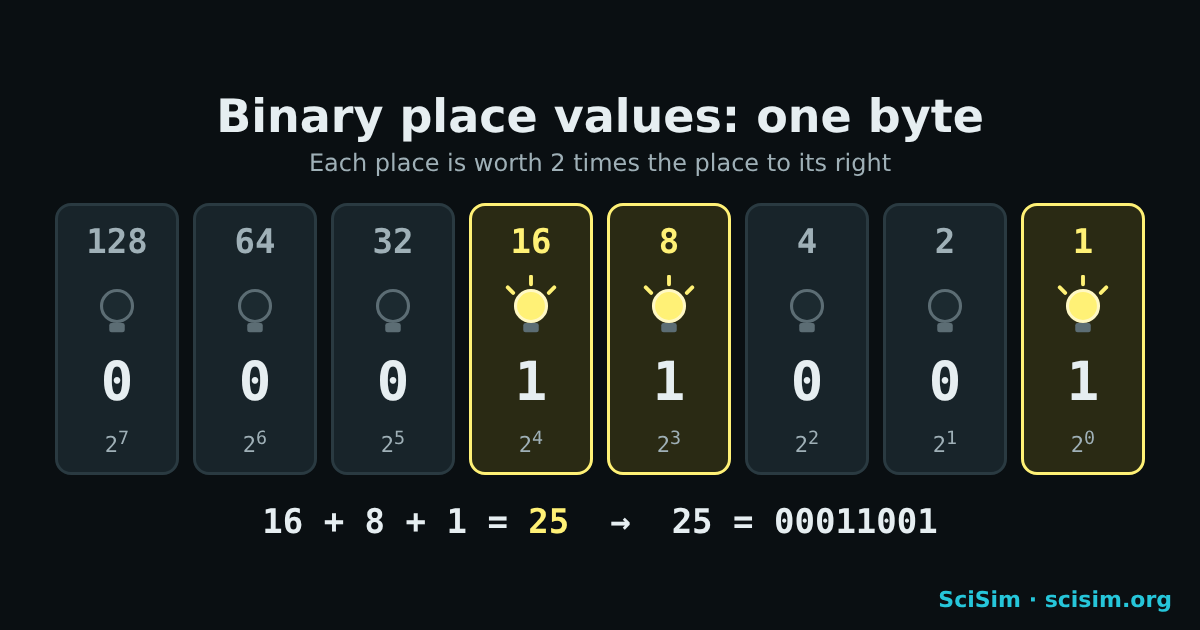
| Place value | 128 | 64 | 32 | 16 | 8 | 4 | 2 | 1 |
|---|---|---|---|---|---|---|---|---|
| Bit | 0 | 0 | 0 | 1 | 1 | 0 | 0 | 1 |
One binary digit is a bit, and 8 bits make a byte. Stanford’s CS106A notes say 8 bits can make 256 different patterns, so one byte holds the numbers 0 to 255. (source: Stanford CS106A, Bits and Bytes)
How do you read binary?
To read binary, write the place values 1, 2, 4, 8 and so on over the digits from right to left, then add the place values that sit over a 1. For 01011010: the 1s sit under 64, 16, 8 and 2, so the number is 64 + 16 + 8 + 2 = 90.
Binary text is read the same way, one byte at a time: 01001000 = 72, the code for the letter H. A byte can hold one letter such as A or x (source: Stanford CS106A, Bits and Bytes).
How do you convert decimal to binary? (worked example: 25)
Converting decimal to binary means finding which powers of 2 add up to the number. There are two common ways, and both give 25 = 11001.
Way 1: take away powers of 2 (good for grades 6–8)
- The biggest power of 2 that fits in 25 is 16. Write 1 in the 16 place: 25 − 16 = 9 left.
- 8 fits in 9. Write 1 in the 8 place: 9 − 8 = 1 left.
- 4 does not fit in 1, so write 0. 2 does not fit, so write 0.
- 1 fits in 1. Write 1 in the 1 place: 1 − 1 = 0. Nothing is left.
- Read the places 16, 8, 4, 2, 1: 11001. In one byte that is 00011001.
Way 2: divide by 2 and read the remainders upward
| Divide | Answer | Remainder | Bulb |
|---|---|---|---|
| 25 ÷ 2 | 12 | 1 | 1 |
| 12 ÷ 2 | 6 | 0 | 2 |
| 6 ÷ 2 | 3 | 0 | 4 |
| 3 ÷ 2 | 1 | 1 | 8 |
| 1 ÷ 2 | 0 | 1 | 16 |
Read the remainders from the bottom up: 1, 1, 0, 0, 1 = 11001. The remainder idea is the same one used in modular arithmetic (25 mod 2 = 1).
How do you convert binary to decimal?
Converting binary to decimal means multiplying each bit by its place value and adding the results. For 11001: 1 × 16 + 1 × 8 + 0 × 4 + 0 × 2 + 1 × 1 = 25.
The biggest number one byte can show is 11111111 = 128 + 64 + 32 + 16 + 8 + 4 + 2 + 1 = 255, the reason a pixel’s red, green and blue values go from 0 to 255 (source: Stanford CS106A, Bits and Bytes). With 16 bits the biggest number is 65,535.
How do you count in binary?
Counting in binary means adding 1 again and again, carrying to the next place whenever a place would reach 2: 0, 1, 10, 11, 100, 101, 110, 111, 1000.
The right bit flips every time you add 1. Adding 1 to 0111 (7) flips 4 bits and gives 1000 (8), like an odometer rolling over. Each extra bit doubles how far you can count: 4 bits make 16 patterns (0 to 15) and 8 bits make 256 (0 to 255) (source: Stanford CS106A, Bits and Bytes).
What is hexadecimal, and how do you convert hex to decimal?
Hexadecimal (hex) is base 16: it uses the digits 0 to 9 and the letters A to F for 10 to 15. One hex digit is exactly 4 bits, so a byte is always 2 hex digits: 11111111 = FF.
To convert hex to decimal, multiply the left digit by 16 and add the right digit: 2F = 2 × 16 + 15 = 47. To go from binary to hex, cut the bits into groups of 4 from the right: 0010 1111 = 2F.
Web colours use hex: in #RRGGBB each pair is one byte for red, green or blue, from 00 to FF (0 to 255) (source: MDN Web Docs, <hex-color>). So #FF8000 is full red, half green, no blue: orange.
What is octal?
Octal is base 8: it uses the digits 0 to 7, and one octal digit is exactly 3 bits. To convert binary to octal, cut the bits into groups of 3 from the right: 11 001 = 31, so 25 in decimal is 31 in octal.
Octal is older than hex in computing and is still used for file permissions on Linux and macOS (for example 755). Hex is more common today because a byte splits evenly into two hex digits but not into octal digits.
How is text written in binary?
Text is written in binary by giving every letter a number, its ASCII code, and storing that number as a byte. A = 65 = 01000001, B = 66, and lowercase a = 97, exactly 32 more than A.
ASCII uses 7 bits, so it has 128 codes. The 1969 network standard RFC 20 suggests sending “standard 7-bit ASCII embedded in an 8 bit byte whose high order bit is always 0” (source: RFC 20, ASCII format for Network Interchange (V. Cerf, 1969)). That is why every ASCII letter in binary starts with 0.
Write Hi in binary in the lab →
To translate whole sentences both ways, with every letter shown as bulbs, try the Binary Translator.
Why do computers use binary?
Computers use binary because their tiny switches, called transistors, have two clear states, off and on, which stand for 0 and 1. Two states are easy to tell apart even when the signal is a little noisy.
Stanford’s CS101 course puts it simply: “The bit stores just a 0 or 1: it’s the smallest building block of storage.” (source: Stanford CS101, Bits and Bytes) Numbers, letters, colours and sounds are all stored as patterns of bits. Programs that search and sort, like binary search and radix sort, work on these numbers.
Binary, hex and octal chart for 0 to 15
A binary chart lists each number with its bits. Four bits count from 0 to 15, which is exactly one hex digit (0 to F).
| Decimal | Binary (4 bits) | Hex | Octal |
|---|---|---|---|
| 0 | 0000 | 0 | 0 |
| 1 | 0001 | 1 | 1 |
| 2 | 0010 | 2 | 2 |
| 3 | 0011 | 3 | 3 |
| 4 | 0100 | 4 | 4 |
| 5 | 0101 | 5 | 5 |
| 6 | 0110 | 6 | 6 |
| 7 | 0111 | 7 | 7 |
| 8 | 1000 | 8 | 10 |
| 9 | 1001 | 9 | 11 |
| 10 | 1010 | A | 12 |
| 11 | 1011 | B | 13 |
| 12 | 1100 | C | 14 |
| 13 | 1101 | D | 15 |
| 14 | 1110 | E | 16 |
| 15 | 1111 | F | 17 |
Go deeper
16 bits, kilobytes and why hex
With 16 bits (two bytes) the places go up to 32,768 and the biggest number is 65,535 (FFFF in hex). Turn on 16 bits in the lab to see it. A kilobyte (kB) is 1,000 bytes in the metric (SI) meaning; many computers still use 1,024 bytes (210) for the same word, which is why the binary unit KiB = 1,024 bytes was named.
Programmers write hex because it is short and lines up with bits: every hex digit is 4 bits, so you can read a byte at a glance.
Letters that are not in ASCII (é, emoji)
ASCII has only 128 codes, so letters like é or ñ and emoji are not in it. Unicode gives every character a number; its first 128 numbers are the same as ASCII, and the UTF-8 encoding stores a character in 1 to 4 bytes. The lab shows these characters as “not in ASCII”.
A fast mental trick: double and add
Read the bits from left to right. Start at 0; for each bit, double the total and add the bit. 11001: 0→1→3→6→12→25. This is how calculators and computers often turn binary into decimal.
Negative numbers and adding in binary
Computers store negative numbers with a trick called two’s complement, and they add binary numbers with logic gates (a half adder and a full adder); try the gates in the Logic Gates Simulator, then add 4-bit numbers with them in the Full Adder Simulator. This lab sticks to whole numbers from 0 to 65,535.
❓ FAQ
Their switches (transistors) have two states, off and on, which stand for 0 and 1. Two states are easy to tell apart, so binary is reliable and simple to build.
Key takeaway: Two states: 0 and 1.A bit is one binary digit, 0 or 1. A byte is 8 bits. One byte can show 256 different patterns, the numbers 0 to 255.
Key takeaway: 8 bits = 1 byte.255, written 11111111 (128 + 64 + 32 + 16 + 8 + 4 + 2 + 1). With 16 bits the biggest number is 65,535.
Key takeaway: 8 bits: 0 to 255.Look up each letter’s ASCII code (A = 65, a = 97), turn each code into 8 bits, and write the bytes in order. Hi = 01001000 01101001.
Key takeaway: One byte per letter.Hex is a short way to write bits: one hex digit = 4 bits, so a byte is 2 hex digits. Web colours (#FF8000), memory addresses and error codes are written in hex.
Key takeaway: 1 hex digit = 4 bits.For teachers
Use the lab on a projector (Full screen) and let students predict before you tap. Guess first hides the other boxes and the bulbs until a student types or builds an answer, so the lab checks their work. Copy link keeps the station and the number, so you can send “make 37” or “decode Hi” to the whole class.
Standard: CSTA K–12 Computer Science Standards (2017), 2-DA-07 (grades 6–8): “Represent data using multiple encoding schemes.” (source: CSTA K-12 CS Standards)
| Time | Step | What students do | Go to |
|---|---|---|---|
| 5 min | Hook | Tap one bulb at a time and say how much the decimal number jumps. | Bulbs |
| 10 min | Count | Count 0 to 16 with + 1; predict how many bulbs change before each tap. | Count |
| 15 min | Convert | Step through 25 both ways, then do three “make this number” tasks with Guess first on. | Decimal to binary |
| 10 min | Read | Read three bytes; then decode a word. | Binary to decimal |
| 5 min | Exit ticket | Write your initials in binary on the name worksheet. | Text |
Printables (open the print dialog; choose “Save as PDF” to keep a file):