Binary Translator: Text to Binary and Binary to Text
Your turn: decode this word
01000011 01000001 01010100
How do you translate binary to text?
To translate binary to text, split the bits into groups of 8, one group for each letter. Add the place values of the 1s in each group to get its ASCII code, then look up the letter. Example: 01001000 is 64 + 8 = 72, the letter H, and 01101001 is 105, the letter i, so it says Hi.
In this lab you can
- Type text and see it in binary at once, or paste binary and read the text: both boxes always match.
- See every letter as 8 bits with its ASCII code, and tap a letter to show it as 8 big bulbs.
- Flip a bulb to change the letter: the 32 bulb turns a capital into a small letter.
- Switch spaces, 7-bit or 8-bit groups, and UTF-8 for letters like é and emoji (2 to 4 bytes).
- Decode a secret word, read plain-English help when the binary has a mistake, and print a binary alphabet chart.
Activities in this lab: Text to binary · Binary to text · Flip the 32 bulb · Decode this word · UTF-8: é and emoji
What is a binary translator?
A binary translator is a tool that turns text into binary code (0s and 1s) and binary code back into text. Computers store every letter as a number, and every number as bits, so “Hi” is stored as 01001000 01101001.
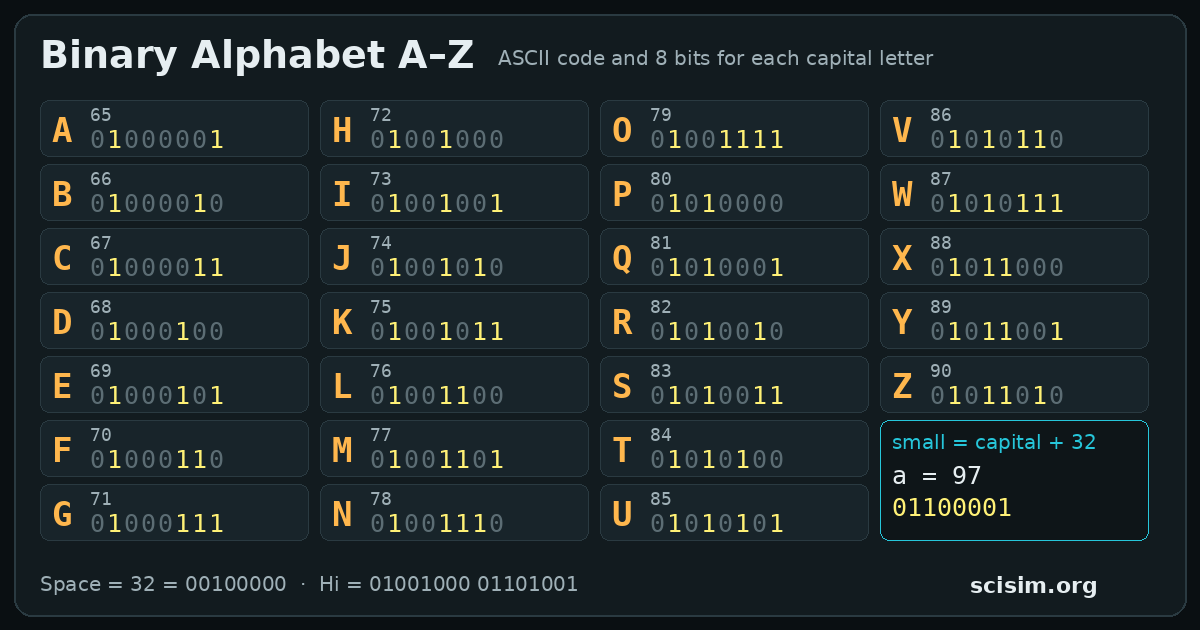
Each group of 8 bits is one byte. Stanford’s CS106A notes explain that 8 bits make 256 different patterns, which is plenty for every letter, digit and sign on a keyboard (source: Stanford CS106A, Bits and Bytes). To see how the 8 places (128 down to 1) make a number, use the Binary Numbers Lab.
How do you translate binary to text? (worked example: 01001000 01101001)
Translating binary to text means reading the bits one byte (8 bits) at a time and turning each byte into its letter.
- Split the bits into groups of 8: 01001000 and 01101001.
- Write the place values 128, 64, 32, 16, 8, 4, 2, 1 over each group.
- Add the place values over the 1s. First group: 64 + 8 = 72. Second group: 64 + 32 + 8 + 1 = 105.
- Look up each code in the ASCII table: 72 = H and 105 = i.
- Put the letters together: the message is Hi.
| Place value | 128 | 64 | 32 | 16 | 8 | 4 | 2 | 1 | Code | Letter |
|---|---|---|---|---|---|---|---|---|---|---|
| Byte 1 | 0 | 1 | 0 | 0 | 1 | 0 | 0 | 0 | 72 | H |
| Byte 2 | 0 | 1 | 1 | 0 | 1 | 0 | 0 | 1 | 105 | i |
If the bits are written with no spaces, cut them into 8s from the left. 16 bits make 2 letters; 15 bits would make 1 letter with 7 bits left over, which means a digit is missing.
How do you write words in binary (text to binary)?
Writing a word in binary means swapping each letter for its ASCII code and writing that code as 8 bits. For CAT:
- Find the codes: C = 67, A = 65, T = 84.
- Turn each code into 8 bits: 67 = 64 + 2 + 1 = 01000011, 65 = 64 + 1 = 01000001, 84 = 64 + 16 + 4 = 01010100.
- Write the bytes in order: 01000011 01000001 01010100.
A space is a character too: code 32, or 00100000. So “HI YOU” needs 6 bytes, not 5.
What is the binary alphabet?
The binary alphabet is the list of letters with their 8-bit ASCII codes. Capital letters run from A = 65 to Z = 90 and small letters from a = 97 to z = 122.
| Capital | Code | Binary | Small | Code | Binary |
|---|---|---|---|---|---|
| A | 65 | 01000001 | a | 97 | 01100001 |
| B | 66 | 01000010 | b | 98 | 01100010 |
| C | 67 | 01000011 | c | 99 | 01100011 |
| D | 68 | 01000100 | d | 100 | 01100100 |
| E | 69 | 01000101 | e | 101 | 01100101 |
| F | 70 | 01000110 | f | 102 | 01100110 |
| G | 71 | 01000111 | g | 103 | 01100111 |
| H | 72 | 01001000 | h | 104 | 01101000 |
| I | 73 | 01001001 | i | 105 | 01101001 |
| J | 74 | 01001010 | j | 106 | 01101010 |
| K | 75 | 01001011 | k | 107 | 01101011 |
| L | 76 | 01001100 | l | 108 | 01101100 |
| M | 77 | 01001101 | m | 109 | 01101101 |
| N | 78 | 01001110 | n | 110 | 01101110 |
| O | 79 | 01001111 | o | 111 | 01101111 |
| P | 80 | 01010000 | p | 112 | 01110000 |
| Q | 81 | 01010001 | q | 113 | 01110001 |
| R | 82 | 01010010 | r | 114 | 01110010 |
| S | 83 | 01010011 | s | 115 | 01110011 |
| T | 84 | 01010100 | t | 116 | 01110100 |
| U | 85 | 01010101 | u | 117 | 01110101 |
| V | 86 | 01010110 | v | 118 | 01110110 |
| W | 87 | 01010111 | w | 119 | 01110111 |
| X | 88 | 01011000 | x | 120 | 01111000 |
| Y | 89 | 01011001 | y | 121 | 01111001 |
| Z | 90 | 01011010 | z | 122 | 01111010 |
Digits are characters too: 0 = 48 = 00110000 up to 9 = 57 = 00111001. The printable chart in the teacher section has all of them.
What is ASCII, and why does every letter start with 0?
ASCII (American Standard Code for Information Interchange) is a code that gives every English letter, digit and sign a number from 0 to 127. It needs only 7 bits, so it has 128 codes; the codes 32 to 126 are the printable ones, and the rest are control codes such as new line (10).
Computers store bytes of 8 bits, so the 7-bit code gets one extra 0 in front. RFC 20, a 1969 network document by Vint Cerf, suggests sending “standard 7-bit ASCII embedded in an 8 bit byte whose high order bit is always 0” (source: RFC 20, ASCII format for Network Interchange (V. Cerf, 1969)). Switch the lab to 7-bit to see the same letters without that 0.
Why are capital and small letters 32 apart?
Capital and small letters are 32 apart because ASCII puts the small letters exactly 32 codes after the capitals, and 32 is one place value in binary. A = 65 = 01000001 and a = 97 = 01100001: only the 32 bit is different.
| Letter | Code | Binary | The 32 bit |
|---|---|---|---|
| A | 65 | 01000001 | off |
| a | 97 | 01100001 | on |
| H | 72 | 01001000 | off |
| h | 104 | 01101000 | on |
So a computer can change a whole word to capitals by switching off one bit in every letter. In the lab, pick a letter and tap its 32 bulb.
How are é and emoji written in binary? (UTF-8)
Letters such as é and ñ, and emoji, are written in binary with UTF-8, a code that uses 1 to 4 bytes per letter. ASCII letters keep their one byte, and other letters get 2, 3 or 4 bytes.
The UTF-8 standard RFC 3629 says every character up to U+10FFFF is stored in a sequence of 1 to 4 bytes, and that “a plain ASCII string is also a valid UTF-8 string” (source: RFC 3629, UTF-8 (F. Yergeau, 2003)).
| Letter | Bytes | Binary |
|---|---|---|
| A | 1 | 01000001 |
| é | 2 | 11000011 10101001 |
| € | 3 | 11100010 10000010 10101100 |
| 😀 (emoji) | 4 | 11110000 10011111 10011000 10000000 |
The first byte tells how many bytes the letter has: 110… means 2, 1110… means 3 and 11110… means 4; every byte after it starts with 10.
Why does my binary not translate?
Binary does not translate when a group is not a real letter code. The lab names the group and tells you what is wrong:
- A digit that is not 0 or 1, such as a 2: binary uses only 0 and 1.
- A group of 9 or more bits: a space is missing, or a digit was typed twice.
- Bits left over: with no spaces, the number of bits must split into groups of 8 (or 7 in 7-bit mode).
- A code that is not a printable letter, such as 00000111 = 7: codes below 32 are control codes.
- A code above 127, such as 11101001: that is not ASCII. Turn on UTF-8 if it is part of a letter like é.
The lab never guesses: it shows the letters before the mistake and nothing after it.
Go deeper
UTF-8 byte patterns
| Code points | Bytes | Pattern |
|---|---|---|
| 0 to 127 (ASCII) | 1 | 0xxxxxxx |
| 128 to 2,047 | 2 | 110xxxxx 10xxxxxx |
| 2,048 to 65,535 | 3 | 1110xxxx 10xxxxxx 10xxxxxx |
| 65,536 to 1,114,111 | 4 | 11110xxx 10xxxxxx 10xxxxxx 10xxxxxx |
The x bits hold the letter’s number. é is 233 = 11101001; in the 2-byte pattern that becomes 11000011 10101001.
Is binary a language?
Binary is not a language like English; it is a way of writing numbers. Text becomes binary only through an agreed code such as ASCII or UTF-8. The same bits 01000001 mean the letter A in ASCII, the number 65, or a shade of a colour in a picture: the program decides which.
Control codes and the 128 bulb
Codes 0 to 31 and 127 were made to control old teleprinters (new line, tab, bell). The lab writes tab and new line, and tells you when a group is another control code. The 128 bulb is always off for an ASCII letter, because ASCII stops at 127.
❓ FAQ
In ASCII one letter is 8 bits (one byte); the code itself needs only 7, so the first bit is 0. In UTF-8, letters like é take 2 bytes and most emoji take 4 (some emoji are made of several characters).
Key takeaway: 8 bits = 1 letter.Capital A is code 65, which is 01000001 in binary (64 + 1). Small a is 97 = 01100001.
Key takeaway: A = 01000001.hello = 01101000 01100101 01101100 01101100 01101111 (h = 104, e = 101, l = 108, o = 111). Hello with a capital H starts 01001000.
Key takeaway: One byte per letter.I love you = 01001001 00100000 01101100 01101111 01110110 01100101 00100000 01111001 01101111 01110101. The two 00100000 bytes are the spaces.
Key takeaway: Spaces count: 00100000.Usually a group has the wrong length, a digit other than 0 or 1, or a code that is not a printable letter. Check that every group has 8 bits; codes above 127 need UTF-8.
Key takeaway: Check 8 bits per group.No. Binary is a way to write numbers with 0 and 1. Codes such as ASCII and UTF-8 agree which number stands for which letter, and that turns bits into text.
Key takeaway: A number code, not a language.For teachers
Put the translator on a projector (Full screen) and let students predict a letter before you type it. Copy link keeps the text, so you can send a word to the class; a secret message link opens with only the binary filled in, and students decode it before they look at the Text box.
Standard: CSTA K–12 Computer Science Standards (2017), 2-DA-07 (grades 6–8): “Represent data using multiple encoding schemes.” (source: CSTA K-12 CS Standards)
| Time | Step | What students do | Go to |
|---|---|---|---|
| 5 min | Hook | Show 01001000 01101001 and ask what it says; reveal Hi. | Hi |
| 10 min | Encode | Type your own name; read the codes of the first two letters from the strip. | Translator |
| 10 min | Pattern | Flip the 32 bulb on three capitals. What changes? Write the rule. | 32 bulb |
| 15 min | Decode | Secret message worksheet (below), then three “decode this word” tasks. | Decode |
| 5 min | Exit ticket | Write your initials in binary without the lab; check with the lab. | Check |
Printables (open the print dialog; choose “Save as PDF” to keep a file):